
AWS Solutions Architect Associate Diaries: SAA-C03 Study Notes
I started pulling these notes together during SAA-C03 prep because the official documentation kept sending me in circles. What I actually needed was a way to pattern-match quickly — given a scenario, which service, and why. These are those notes. I am adding modules as I work through them, ten total.
Module 1: Architecting Fundamentals
The exam keeps coming back to one question: given a scenario, what is the right design decision and why. Module 1 is about the mental model behind those decisions — the Well-Architected Framework and the principles AWS expects you to apply.
Well-Architected Framework
Six pillars. The exam does not ask you to recite them, but it tests whether you can apply them.
| Pillar | Core Question |
|---|---|
| Operational Excellence | Can we operate and improve the system easily? |
| Security | Are data, systems, and users protected? |
| Reliability | Does the system keep working when things fail? |
| Performance Efficiency | Are we using resources efficiently? |
| Cost Optimization | Are we wasting money? |
| Sustainability | Are we minimising environmental impact? |
Sustainability shows up occasionally. The others come up constantly.
Core Design Principles
These four come up in almost every scenario question.
AWS assumes failures will happen. A single EC2 with a single database is a bad design. The expected answer is multiple AZs, Auto Scaling, and a load balancer.
When two answers both work, pick the one with less operational effort. RDS over EC2 with MySQL. Lambda over EC2 for event processing. AWS wants you to use managed services.
If one application directly calls another, a failure in one cascades to the other. SQS between them breaks that dependency.
Adding more servers scales better than making one server bigger. Horizontal scaling requires a load balancer and is what the exam expects when availability is mentioned.
Key Concepts
Scalability is the ability to grow. Elasticity is automatic growth and shrink. The exam uses both words but means different things by them.
High availability minimises downtime. Fault tolerance means the system keeps running through a failure. Multi-AZ gives you both.
The shared responsibility model trips people up. AWS is responsible for the physical infrastructure. You are responsible for everything you put on top of it.
AWS  = Security OF the cloud (hardware, data centres, networking)
You  = Security IN the cloud (IAM, encryption, OS patches, security groups)
Common Exam Architectures
Highly available web application:
Users
  |
 ALB
  |
Auto Scaling Group
  |
EC2 (multiple AZs)
Decoupled architecture:
App --> SQS --> Workers
Event-driven serverless:
S3 Upload --> Lambda --> Process
Exam Keyword Map
| Keyword | Answer |
|---|---|
| Highly available | Multi-AZ |
| Scalable / Elastic | Auto Scaling |
| Decouple / Buffer | SQS |
| Managed service | Let AWS manage it |
| Fault tolerant | Multiple AZs |
| Single point of failure | Eliminate it |
| Monitoring | CloudWatch |
| Audit | CloudTrail |
Cheat Sheet
Pillars
  Operational Excellence, Security, Reliability,
  Performance Efficiency, Cost Optimization, Sustainability

Principles
  Design for Failure
  Use Managed Services
  Decouple Components
  Scale Horizontally

When stuck on a scenario question, ask:
  What is the bottleneck?
  What is the single point of failure?
  Can AWS manage this instead?
Module 2: Account Security
Every security question comes down to three things: who is making the request, what are they allowed to do, and how do we enforce that at scale. IAM is the answer to all three.
Identities
A principal is anything that can make a request to AWS — a person, an application, or an AWS service.
| Identity | Represents | Use when |
|---|---|---|
| IAM User | One person | Permanent credentials for a human |
| IAM Group | Collection of users | Multiple people need the same permissions |
| IAM Role | Temporary access | A service or app needs to call another AWS service |
The one that trips people up is the role. A role has no username and no password. It issues temporary credentials. When EC2 needs to read from S3, you attach a role to the EC2 — you do not put access keys on the server.
Human        -> User
Many humans  -> Group
Service/App  -> Role
Policies
Policies are JSON documents that say what is allowed or denied. You attach them to users, groups, or roles.
{
  "Effect": "Allow",
  "Action": "s3:GetObject",
  "Resource": "*"
}
Two types come up on the exam:
Identity-based policies attach to a user, group, or role. Resource-based policies attach directly to the resource — an S3 bucket policy is the most common example. If you need to grant another AWS account access to your bucket, you use a bucket policy.
One rule that never changes: an explicit Deny always wins over an Allow, regardless of what other policies say.
Least Privilege
Grant only what is required. Nothing more. This is the answer whenever the question asks about security best practice for permissions. AdministratorAccess for everyone is the wrong answer even if it works.
MFA and Root
The root account is created automatically and has unlimited access. Best practice is to enable MFA on it and then not use it for day-to-day work.
MFA adds a second factor on top of a password. Any question about improving account security without changing permissions points to MFA.
Access keys are for programmatic access — CLI, SDK, applications. They are not for console login.
Managing Multiple Accounts
Large organisations rarely run everything in one AWS account. Production, development, and security typically live in separate accounts.
AWS Organizations manages all of them from a single place.
Organization
     |
    OU (Production)
   /    \
Acct A  Acct B

    OU (Development)
        |
      Acct C
Organizational Units (OUs) are logical containers. You apply policies to an OU and every account inside it inherits them.
Service Control Policies (SCPs) set the maximum permissions any account in that OU can have. An SCP does not grant permissions — it only limits them. Even an account admin cannot exceed what the SCP allows.
IAM Policy  -> grants permissions
SCP         -> limits permissions
IAM Identity Center (formerly Single Sign-On) gives users one login that works across all accounts and applications. If the question mentions one login for many AWS accounts, this is the answer.
Cross-account access works through roles. Account A assumes a role in Account B. No credential sharing, no permanent access.
Cheat Sheet
Human needs access?          -> IAM User
Many humans, same access?    -> IAM Group
Service needs AWS access?    -> IAM Role
Secure root account?         -> Enable MFA
Programmatic access?         -> Access Keys
EC2 accessing S3?            -> IAM Role, not access keys

Grant access to S3 bucket?   -> Bucket Policy
Restrict entire account?     -> SCP
Manage many accounts?        -> AWS Organizations
One login across accounts?   -> IAM Identity Center
Cross-account access?        -> Assume Role

Explicit Deny always wins.
SCP limits, IAM grants.
Module 3: Networking 1
Networking questions are about understanding how traffic moves — into AWS, through it, and between services. Most of the confusion comes from mixing up which component does what. Once the mental model is clear, the questions get straightforward.
IP Addressing
Every resource in AWS has an IP address. Public IPs are reachable from the internet. Private IPs only work inside your VPC.
Public IP   54.22.18.7    anyone on the internet can reach it
Private IP  10.0.1.10     only reachable inside your network
CIDR notation defines how large a network is. The number after the slash tells you how many addresses are in the block. Smaller number means more addresses.
10.0.0.0/16   65,536 addresses   large
10.0.1.0/24      256 addresses   small
VPC
A VPC (Virtual Private Cloud) is your isolated private network inside AWS. Nothing else runs in it unless you put it there. Every AWS account gets a default VPC that works immediately. Most production environments use a custom VPC for more control.
A VPC lives in one region. It cannot span regions. It can span multiple Availability Zones, which is how you get high availability.
Inside a VPC you create subnets. A subnet lives in one AZ.
VPC (us-east-1)
  |
  +-- Public Subnet  (AZ-A)
  +-- Private Subnet (AZ-A)
  +-- Public Subnet  (AZ-B)
  +-- Private Subnet (AZ-B)
Public subnets have a route to the internet. They hold load balancers, bastion hosts, and NAT Gateways. Private subnets have no direct internet access. Databases and application servers belong here.
Internet Gateway and Route Tables
An Internet Gateway is what connects a VPC to the internet. Without one, nothing in the VPC can reach the internet and nothing from the internet can reach the VPC.
Route tables tell traffic where to go. A public subnet has a route table entry that sends outbound traffic to the Internet Gateway.
Destination   Target
0.0.0.0/0     Internet Gateway
That single entry is what makes a subnet public.
Elastic IP and NAT Gateway
A regular public IP on an EC2 instance changes when the instance stops and starts. An Elastic IP is a static public IP that stays the same. Useful when external systems need to connect to a fixed address.
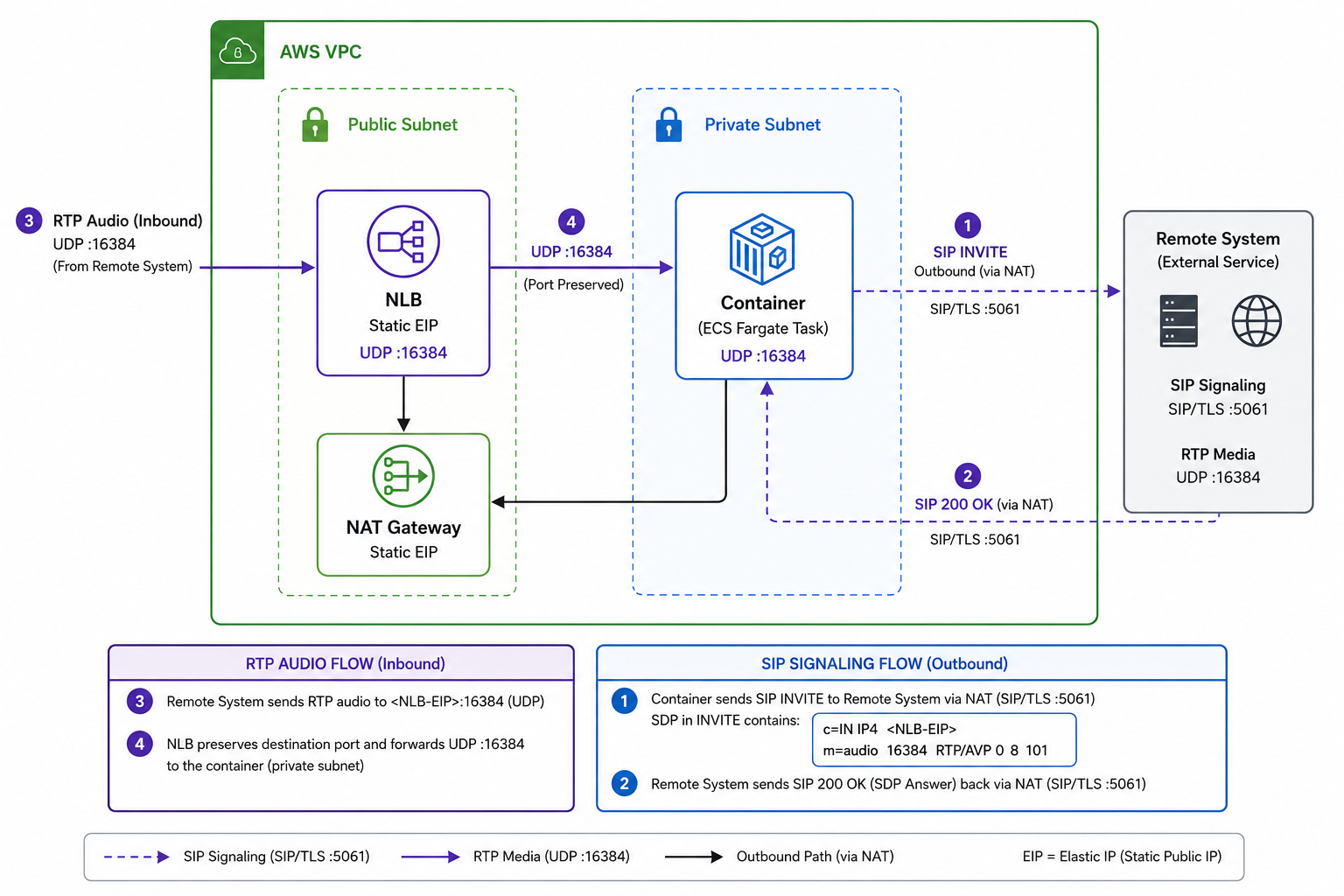
NAT Gateway solves a specific problem: a private EC2 needs to reach the internet (to download updates, call an API) but you do not want the internet to be able to initiate connections back to it.
Private EC2
     |
Private Subnet
     |
NAT Gateway  (lives in public subnet)
     |
Internet Gateway
     |
Internet
The private EC2 can initiate outbound connections. The internet cannot initiate inbound ones. NAT Gateway needs to live in a public subnet and needs an Elastic IP.
Security Groups and Network ACLs
These are the two layers of traffic control. They are often confused because they both filter traffic, but they operate at different levels and behave differently.
Security Groups attach to individual EC2 instances. They are stateful — if you allow inbound traffic, the response is automatically allowed out without a separate rule. They only support allow rules. Everything not explicitly allowed is blocked.
Network ACLs (NACLs) attach to subnets. They are stateless — you need explicit rules for both inbound and outbound traffic. They support both allow and deny rules.
| Feature | Security Group | Network ACL |
|---|---|---|
| Applies to | EC2 instance | Subnet |
| Stateful | Yes | No |
| Deny rules | No | Yes |
| Default behaviour | Deny all inbound | Allow all (default NACL) |
The practical difference: if you need to block a specific IP address from reaching your subnet, you need a NACL because Security Groups cannot deny. If you just need to control what ports an EC2 accepts, a Security Group is enough.
Full Architecture
How all the pieces fit together in a standard two-tier setup:
Internet
    |
Internet Gateway
    |
Public Subnet
  Load Balancer
  NAT Gateway
    |
Private Subnet
  EC2 App Servers
  RDS Database
Security Groups protect each instance. NACLs protect each subnet. Route tables direct traffic between them.
Cheat Sheet
Private network in AWS?          -> VPC
Section of a VPC in one AZ?      -> Subnet
Connect VPC to internet?         -> Internet Gateway
Private EC2 outbound internet?   -> NAT Gateway
Static public IP?                -> Elastic IP
Instance-level firewall?         -> Security Group
Subnet-level firewall?           -> Network ACL
Traffic routing rules?           -> Route Table

Security Group  = stateful, allow only, per instance
Network ACL     = stateless, allow + deny, per subnet
NAT Gateway     = outbound only, lives in public subnet
VPC             = one region, can span multiple AZs
Module 4: Compute
Compute questions ask one thing: who runs your code, and under what conditions. The answer depends on how much control you need, how long the code runs, and how predictable the traffic is.
The Control Spectrum
Most control    EC2          you manage the OS
                Containers   ECS / EKS / Fargate
Least control   Lambda       AWS manages everything
More control means more maintenance. Less control means more automation. The exam usually rewards choosing the least control that still meets the requirements.
EC2
A virtual server in AWS. You choose the CPU, RAM, OS, and disk. AWS manages the physical hardware. You manage everything above it — the OS, patches, applications, and firewall rules.
When you launch an EC2 instance you pick two things:
An AMI (Amazon Machine Image) is the blueprint — the OS and any pre-installed software. An instance type defines the hardware size.
Instance type families tell you what the hardware is optimised for:
| Family | Optimised for | Use when |
|---|---|---|
| T | Burstable, cheap | Dev, testing, low-traffic sites |
| M | General purpose | Most standard workloads |
| C | CPU | Gaming, encoding, scientific compute |
| R | Memory | Databases, in-memory caching |
| P / G | GPU | Machine learning, AI, video rendering |
EC2 Storage
Two options. They behave very differently.
EBS (Elastic Block Store) is a persistent volume attached to the instance. Data survives reboots and stop/start cycles. You can take snapshots of it, which are stored in S3 and used for backup or cloning volumes.
Instance Store is temporary storage physically attached to the host. It is fast, but if the instance stops or terminates, the data is gone. Use it for caches and scratch space, never for anything you need to keep.
EBS            -> persists after stop/start
Instance Store -> gone when instance stops
EC2 Pricing
This is tested heavily. The question usually gives you a workload description and asks which pricing model fits.
| Model | Commitment | Cost | Use when |
|---|---|---|---|
| On-Demand | None | Highest | Unpredictable or short-term workloads |
| Reserved | 1 or 3 years | Up to 72% off | Always-on, predictable workloads |
| Savings Plans | 1 or 3 years | Similar to Reserved | More flexibility across compute services |
| Spot | None | Up to 90% off | Interruptible jobs — AWS can reclaim anytime |
| Dedicated Host | On-Demand or Reserved | Highest | Licensing or compliance requirements |
Spot is the cheapest but AWS can terminate the instance with two minutes notice. Never use it for anything that cannot tolerate interruption.
Savings Plans are generally preferred over Reserved Instances now because they apply more broadly across compute services.
Lambda
You upload code. AWS runs it when an event triggers it, then stops. No server to provision, patch, or manage.
Event (S3 upload, API call, schedule)
    |
  Lambda runs your code
    |
  Stops
Key constraints: maximum execution time is 15 minutes. No OS access. Scales automatically.
Good for event-driven processing, APIs, automation, and scheduled jobs. Not suitable for long-running processes or anything that needs OS-level control.
| EC2 | Lambda | |
|---|---|---|
| Server management | You | AWS |
| Runs | Continuously | Only when invoked |
| Billing | While running | Per invocation and duration |
| OS access | Yes | No |
| Max runtime | Unlimited | 15 minutes |
Cheat Sheet
Virtual server, full OS control?     -> EC2
Serverless, event-driven?            -> Lambda
Persistent EC2 storage?              -> EBS
Temporary fast storage?              -> Instance Store
Backup an EBS volume?                -> Snapshot
Distribute traffic across EC2s?      -> ELB
Auto add/remove EC2s?                -> Auto Scaling

Pricing
  Unpredictable workload?            -> On-Demand
  Always-on, long-term?              -> Savings Plans
  Interruptible batch jobs?          -> Spot
  Compliance / licensing?            -> Dedicated Host

Lambda max runtime = 15 minutes
Instance Store = lost on stop/terminate
EBS = persists, snapshotable
Module 5: Storage
Storage questions come down to matching the data access pattern to the right service. Get that mapping right and most storage questions answer themselves.
Service Overview
| Service | Think of it as | Best for |
|---|---|---|
| S3 | Infinite file cabinet | Files, backups, images, logs |
| EBS | Hard drive attached to a server | EC2 storage |
| EFS | Shared network drive | Multiple EC2s accessing same files |
| FSx | Managed enterprise file systems | Windows/HPC workloads |
| Glacier | Deep archive vault | Long-term backups |
Amazon S3
Objects live in buckets. S3 is not a file system — photos/2025/image.jpg is just the object name, not a real folder path. There are no actual directories.
11 nines durability, regional, scales automatically, no capacity planning needed.
Storage classes — the exam tests whether you can match access frequency to the right class:
| Class | Use when | Cost |
|---|---|---|
| Standard | Frequently accessed | Highest |
| Standard-IA | Occasional access, immediate retrieval | Lower storage, retrieval fee |
| One Zone-IA | Re-creatable data, one AZ is acceptable | Cheaper, riskier |
| Glacier Instant | Rare access, still immediate | Low |
| Glacier Flexible | Archive, minutes-to-hours retrieval | Very low |
| Glacier Deep Archive | Almost never accessed | Cheapest |
Lifecycle policies move objects between classes automatically. No manual work:
Day 0   -> Standard
Day 30  -> Standard-IA
Day 90  -> Glacier
Day 365 -> Delete
Versioning keeps old copies when you overwrite or delete. If the question mentions recovering a deleted file, versioning is the answer.
Cross-Region Replication copies objects to another region automatically. Requires versioning on both buckets. Used for disaster recovery and reducing latency for global users.
Encryption options:
| Type | Who manages keys | When to use |
|---|---|---|
| SSE-S3 | AWS | Simplest option |
| SSE-KMS | AWS KMS | Need auditing and key control |
| SSE-C | Customer | Customer-managed keys |
SSE-KMS comes up most when the question mentions auditing or key control alongside encryption.
S3 can also host static websites — HTML, CSS, JavaScript, no servers needed. If the question says cheap static website, S3 is the answer.
Amazon EBS
A block storage volume attached to one EC2 instance. Data persists across reboots.
EC2
 |
EBS
Snapshots back up to S3. Use them for backup, restore, and copying volumes across regions.
Amazon EFS
A shared file system that multiple Linux EC2 instances can mount at the same time.
EC2-A \
EC2-B -- EFS
EC2-C /
EBS vs EFS:
| Feature | EBS | EFS |
|---|---|---|
| Storage type | Block | File |
| Shared across EC2s | No | Yes |
| OS | Any | Linux only |
FSx
FSx for Windows supports SMB and Active Directory. If the question mentions a Windows file share, this is the answer.
FSx for Lustre is for high-performance computing workloads — machine learning, analytics, scientific computing.
Storage Gateway
Connects on-premises storage to AWS. Used for hybrid storage and migrations.
| Mode | Protocol | AWS backend | Use when |
|---|---|---|---|
| File Gateway | NFS / SMB | S3 | File shares stored in S3 |
| Volume Gateway (Cached) | iSCSI | AWS primary | Primary data in AWS, cache locally |
| Volume Gateway (Stored) | iSCSI | AWS snapshots | Primary data on-prem, backup to AWS |
| Tape Gateway | Virtual tape | S3 + Glacier | Replace physical tape backups |
The mode matters. Cached Volumes means primary data lives in AWS. Stored Volumes means primary data stays on-prem with AWS as the backup.
Snow Family
Physical devices for moving data when the internet is too slow.
| Device | Scale |
|---|---|
| Snowcone | Small |
| Snowball | Medium (up to hundreds of TB) |
| Snowmobile | Petabytes / exabytes |
The rule of thumb: if uploading over the internet would take weeks, use a Snow device instead.
Cheat Sheet
Files?                  -> S3
One EC2 disk?           -> EBS
Many EC2 shared disk?   -> EFS
Windows file share?     -> FSx for Windows
HPC / ML workloads?     -> FSx for Lustre
Archive?                -> Glacier
Hybrid storage?         -> Storage Gateway
Massive data move?      -> Snowball
Recover deleted S3?     -> Versioning
Automatic tiering?      -> Lifecycle Policy
Cross-region copy?      -> CRR
Encryption + auditing?  -> SSE-KMS
Primary in AWS?         -> Cached Volumes
Primary on-prem?        -> Stored Volumes
Replace tape backups?   -> Tape Gateway
Module 6: Database Services
Database questions are about matching the data model to the right service. The exam does not expect you to know SQL syntax or DynamoDB internals. It expects you to read a scenario and pick the right tool.
Service Overview
| Service | Type | Use when |
|---|---|---|
| RDS | Relational SQL | Structured data, joins, transactions |
| Aurora | Relational SQL | Need MySQL/PostgreSQL with better performance |
| DynamoDB | NoSQL key-value | Massive scale, millisecond latency, serverless |
| ElastiCache | In-memory cache | Reduce database load, sub-millisecond reads |
| Redshift | Data warehouse | Analytics on large datasets |
| DocumentDB | Document (MongoDB) | Migrating MongoDB workloads |
| Neptune | Graph | Relationship-heavy data |
| Timestream | Time-series | IoT sensors, metrics over time |
| QLDB | Immutable ledger | Cryptographically verifiable audit trail |
RDS
RDS manages relational databases — MySQL, PostgreSQL, MariaDB, Oracle, SQL Server. AWS handles backups, patching, and failover. You handle the data and queries.
Use RDS when the question mentions SQL, ACID transactions, joins, or structured data.
Multi-AZ keeps a standby replica in a second AZ. If the primary fails, AWS fails over automatically. This is for availability, not performance.
Read Replicas offload read traffic from the primary. If the question says the database is overloaded by reads, add a read replica.
| Multi-AZ | Read Replica | |
|---|---|---|
| Purpose | High availability | Read scaling |
| Failover | Automatic | Manual promotion |
| Helps with DR | Yes | No |
The exam loves this comparison. Multi-AZ is the availability answer. Read Replica is the performance answer. They are not interchangeable.
Aurora
Aurora is AWS’s own database engine, compatible with MySQL and PostgreSQL. It stores 6 copies of data across 3 AZs automatically. It supports up to 15 read replicas. It is faster and more available than standard RDS.
Aurora Serverless scales capacity up and down automatically. Use it for unpredictable or infrequent workloads where you do not want to provision a fixed instance size.
DynamoDB
A serverless NoSQL key-value database. No SQL, no joins, no schema. You look up items by partition key. It scales to millions of requests per second with millisecond latency.
DAX (DynamoDB Accelerator) is an in-memory cache in front of DynamoDB. If the question asks for microsecond latency on DynamoDB reads, DAX is the answer.
DynamoDB Global Tables replicate data across multiple regions, all writable. Use it when the question asks for a global active-active database with low latency everywhere.
ElastiCache
An in-memory cache that sits in front of a database. Frequently read data is served from memory instead of hitting the database on every request.
Two engines: Redis and Memcached. Redis supports replication and persistence. Memcached is simpler. When in doubt, Redis is the answer.
Without cache:  App -> Database (every request)
With cache:     App -> Cache   (most requests)
                App -> Database (cache miss only)
Redshift
A data warehouse for analytics. Not for transactional workloads. Use it when the question involves querying petabytes of historical data, business intelligence, or reporting.
RDS       = run transactions
Redshift  = run reports
Specialist Databases
DocumentDB is MongoDB-compatible. If the question mentions migrating a MongoDB application, DocumentDB is the answer.
Neptune is a graph database. Use it when the data is about relationships — social networks, fraud detection, recommendation engines.
Timestream is for time-series data — IoT sensors, CPU metrics, anything where every record has a timestamp and you query across time ranges.
QLDB is an immutable ledger. Records cannot be altered or deleted without leaving a trace. Use it when the question mentions cryptographically verifiable history or financial audit trails.
Cheat Sheet
SQL / relational?                -> RDS
SQL with better performance?     -> Aurora
Unpredictable DB workload?       -> Aurora Serverless
Availability / failover?         -> Multi-AZ
Read scaling?                    -> Read Replica
NoSQL, massive scale?            -> DynamoDB
Microsecond DynamoDB reads?      -> DAX
Global active-active NoSQL?      -> DynamoDB Global Tables
Reduce DB load with cache?       -> ElastiCache
Analytics on large datasets?     -> Redshift
MongoDB migration?               -> DocumentDB
Relationship data?               -> Neptune
Sensor / time-series data?       -> Timestream
Immutable audit trail?           -> QLDB

Multi-AZ   = availability, automatic failover
Read Replica = performance, read scaling
These are not the same thing.
Module 7: Monitoring and Scaling
Two problems this module solves: knowing when something is wrong, and handling more traffic without manual intervention. The services split cleanly along those two lines.
Monitoring
CloudWatch collects metrics from AWS resources — CPU, network, disk, memory (with a custom metric agent). You set alarms on those metrics to trigger notifications, Auto Scaling actions, or Lambda functions. CloudWatch Logs stores log output from applications, Lambda, and EC2.
CloudTrail records every API call made in your account — who did what, when, and from where. It is not for performance monitoring. It is for auditing.
AWS Config tracks configuration changes to resources over time. If a security group was modified or an S3 bucket became public, Config has the history.
Trusted Advisor scans your account and flags cost, security, performance, and fault tolerance issues. Unused EBS volumes, open security group ports, underutilised instances — that kind of thing.
The confusion between these four comes up constantly:
| Service | Answers the question |
|---|---|
| CloudWatch | Is something performing badly right now? |
| CloudTrail | Who made that change? |
| AWS Config | What did this resource look like before? |
| Trusted Advisor | What should I fix to save money or improve security? |
Load Balancing
A load balancer distributes incoming traffic across multiple EC2 instances. It also stops sending traffic to unhealthy instances automatically.
Three types, each for a different layer:
| Type | Layer | Use when |
|---|---|---|
| ALB | 7 (HTTP/HTTPS) | Route by URL path, hostname, or headers |
| NLB | 4 (TCP/UDP) | Highest throughput, lowest latency |
| GWLB | 3 | Routing traffic through third-party firewalls |
ALB is the most common exam answer. If the question mentions routing /api to one target group and /images to another, that is ALB. If the question asks for the highest performance TCP load balancer, that is NLB.
Auto Scaling
Auto Scaling adds and removes EC2 instances based on demand. You define three numbers: minimum (never go below), desired (target), and maximum (never exceed).
Three scaling policies:
- Dynamic: reacts to a metric, typically CPU. When CPU exceeds a threshold, add instances.
- Scheduled: fires at a known time. Use when traffic patterns are predictable — scale up every Monday morning.
- Predictive: AWS analyses historical patterns and scales ahead of expected demand.
ELB and Auto Scaling Together
This architecture appears in almost every exam section:
Users
  |
 ALB
  |
Auto Scaling Group
 / | \
EC2 EC2 EC2
When traffic rises, Auto Scaling adds instances and ALB starts routing to them. When an instance fails a health check, ALB stops sending it traffic and Auto Scaling replaces it.
Cheat Sheet
Resource metrics and alarms?        -> CloudWatch
Who made an API call?               -> CloudTrail
Configuration change history?       -> AWS Config
Cost and security recommendations?  -> Trusted Advisor

Route by URL path?                  -> ALB
Highest performance TCP?            -> NLB
Third-party firewall appliances?    -> GWLB

Auto add/remove EC2s?               -> Auto Scaling
CPU-based scaling?                  -> Dynamic scaling
Known traffic pattern?              -> Scheduled scaling
Forecast-based scaling?             -> Predictive scaling

CloudWatch  = what is happening
CloudTrail  = who did it
AWS Config  = what changed
Module 8: Automation
The core idea here is infrastructure as code. Instead of clicking through the console to build an environment, you write a template that describes what you want and AWS builds it. The same template can recreate the same environment identically every time.
CloudFormation
CloudFormation is AWS’s infrastructure as code service. You write a YAML or JSON template describing your resources — VPC, EC2, RDS, security groups, load balancers — and CloudFormation creates them as a single unit called a stack.
Resources:
  MyBucket:
    Type: AWS::S3::Bucket
  MyEC2:
    Type: AWS::EC2::Instance
When you update the template and apply it, CloudFormation changes only what is different. When you delete the stack, it deletes all the resources inside it.
The exam tests four specific CloudFormation concepts:
Drift happens when someone manually changes a resource that CloudFormation manages. The deployed infrastructure no longer matches the template. CloudFormation can detect this. If the question describes a manual change to a CloudFormation-managed resource, the answer involves drift detection.
Change Sets let you preview what will change before applying an update — which resources will be added, modified, or deleted. Think of it as a diff before you commit.
Rollback happens automatically if a stack update fails partway through. CloudFormation returns the infrastructure to its last known good state.
Stack is the running collection of resources created from a template. Template defines what you want. Stack is what exists.
Template -> CloudFormation -> Stack -> Resources
Why It Matters for the Exam
The exam uses CloudFormation as the answer whenever the question involves:
- identical environments across dev, test, and production
- recreating infrastructure after an outage
- version-controlled infrastructure
- consistent, repeatable deployments
Amazon Q Developer
Amazon Q Developer is an AI assistant for software development and AWS tasks. It can write code, explain errors, generate CloudFormation templates, and answer AWS architecture questions. It shows up occasionally in the exam as the answer when the question asks about an AI coding assistant or automated code generation within AWS.
Cheat Sheet
Infrastructure as code?              -> CloudFormation
Identical dev/test/prod environments?-> CloudFormation
Manual change to managed resource?   -> Drift
Preview changes before applying?     -> Change Set
Failed update, restore previous?     -> Rollback
AI coding assistant for AWS?         -> Amazon Q Developer

Template  = what you want
Stack     = what exists
Drift     = reality no longer matches template
Module 9: Containers
Containers sit between EC2 and Lambda on the control spectrum. More portable than EC2, more flexible than Lambda. The exam does not test container internals — it tests when to use ECS vs EKS vs Fargate.
What a Container Is
A container packages an application together with everything it needs to run — runtime, libraries, dependencies, config. It runs the same way regardless of where it is deployed. The image is the blueprint. The running container is the instance of it.
Docker images are stored in Amazon ECR (Elastic Container Registry). Services pull images from ECR to run them.
Developer builds image
        |
     Amazon ECR  (stores images)
        |
   ECS or EKS   (runs containers)
        |
     Customers
Microservices
A monolithic application bundles everything — login, payments, orders, search — into one deployable unit. If one part fails or needs scaling, the whole thing is affected.
Microservices split those into independent services. Each runs separately, scales separately, and fails independently. Containers are the natural fit for microservices because each service becomes its own container.
Container Services
ECS (Elastic Container Service) is AWS’s own container orchestration service. It handles scheduling, scaling, and placement. Use it when you want AWS-native container management and are not already invested in Kubernetes.
EKS (Elastic Kubernetes Service) runs managed Kubernetes on AWS. Use it when the company already uses Kubernetes or needs portability across clouds. If the question mentions Kubernetes, the answer is EKS.
Fargate is the serverless compute layer for containers. It removes the need to provision or manage EC2 instances underneath your containers. Fargate is not a standalone service — it is a launch type used with ECS or EKS.
No Kubernetes requirement?   -> ECS
Already using Kubernetes?    -> EKS
Don't want to manage EC2?    -> add Fargate to either
| Service | Manages orchestration | Manages servers |
|---|---|---|
| ECS | Yes (AWS-native) | You (unless using Fargate) |
| EKS | Yes (Kubernetes) | You (unless using Fargate) |
| Fargate | No | AWS |
The most common exam scenario: containers, no Kubernetes requirement, no server management. Answer is ECS with Fargate.
Cheat Sheet
Store Docker images?             -> Amazon ECR
AWS-native container management? -> ECS
Already using Kubernetes?        -> EKS
No server management?            -> Fargate (with ECS or EKS)
App split into independent parts?-> Microservices

ECR   = stores images, does not run them
Fargate = execution engine, not a standalone service
ECS   = AWS proprietary
EKS   = Kubernetes
Module 10: Networking 2
Module 3 covered how traffic moves inside a VPC. This module is about how VPCs talk to each other, how AWS services are accessed privately, and how on-premises networks connect to AWS.
VPC Endpoints
By default, when an EC2 instance in a private subnet calls an AWS service like S3, that traffic routes out through a NAT Gateway and over the public internet — even though both are AWS. A VPC Endpoint keeps that traffic on the private AWS network.
Two types:
Gateway Endpoint works only for S3 and DynamoDB. It is free and added to a route table. If the question says EC2 needs to access S3 or DynamoDB without going through the internet, this is the answer.
Interface Endpoint (AWS PrivateLink) works for almost every other AWS service — Secrets Manager, SQS, SNS, CloudWatch, KMS, and more. It creates an Elastic Network Interface inside your subnet. More flexible, but has a cost.
Gateway Endpoint   -> S3 and DynamoDB only, free
Interface Endpoint -> everything else, uses ENI
VPC Peering
VPC Peering connects two VPCs so their resources can communicate privately over the AWS backbone, not the internet.
Two rules the exam tests repeatedly:
CIDR blocks cannot overlap. If VPC A is 10.0.0.0/16 and VPC B is 10.0.1.0/24, they overlap and cannot be peered.
Peering is not transitive. If A peers with B, and B peers with C, A cannot reach C through B. You need a direct peering connection between A and C.
A -- B -- C    A cannot reach C
A -- B         direct peering required
A -- C
Hybrid Networking
Hybrid means some infrastructure stays on-premises and some runs in AWS. Two ways to connect them:
Site-to-Site VPN creates an encrypted tunnel over the public internet. It has two components: a Virtual Private Gateway on the AWS side (attached to the VPC) and a Customer Gateway on the on-premises side (your router or firewall). AWS always creates two redundant IPsec tunnels for high availability.
On-premises
     |
Customer Gateway
     || (two tunnels)
Virtual Private Gateway
     |
    VPC
Direct Connect is a dedicated private fibre connection between your data centre and AWS. No internet. Predictable latency, consistent bandwidth. More expensive and slower to set up than VPN, but the right answer when the question asks for reliable, high-bandwidth, low-latency hybrid connectivity.
| VPN | Direct Connect | |
|---|---|---|
| Path | Public internet | Dedicated fibre |
| Setup time | Fast | Weeks to months |
| Cost | Low | High |
| Latency | Variable | Consistent |
| Use when | Quick or temporary | Enterprise, high bandwidth |
A common architecture combines both: Direct Connect as the primary path, VPN as the failover. The exam calls this resilient hybrid connectivity.
Transit Gateway
When you have many VPCs, peering every pair becomes unmanageable. Transit Gateway acts as a central hub. Each VPC, VPN, or Direct Connect connection attaches to it once, and Transit Gateway routes traffic between them.
The connection from any network to a Transit Gateway is called an attachment — a VPC attachment, a VPN attachment, a Direct Connect attachment.
        Transit Gateway
       /    |    |    \
    VPC   VPC   VPN   Direct Connect
Transit Gateway has its own route tables that control which attachments can communicate with each other.
VPC Peering is still the right answer for connecting exactly two VPCs simply. Transit Gateway is the answer when you have many VPCs or need to combine VPCs with on-premises connectivity.
Cheat Sheet
Private access to S3 or DynamoDB?    -> Gateway Endpoint
Private access to other AWS services?-> Interface Endpoint (PrivateLink)
Connect two VPCs?                    -> VPC Peering
Connect many VPCs?                   -> Transit Gateway
Quick encrypted on-prem connection?  -> Site-to-Site VPN
Dedicated high-bandwidth connection? -> Direct Connect
Resilient hybrid (primary + backup)? -> Direct Connect + VPN

Site-to-Site VPN components:
  AWS side      -> Virtual Private Gateway
  On-prem side  -> Customer Gateway
  Tunnels       -> Two (redundant)

Connection to Transit Gateway        -> Attachment
VPC Peering: no overlapping CIDRs, not transitive
Module 11: Serverless
Serverless does not mean no servers. It means AWS manages the servers and you only think about the code and the architecture. You pay for what runs, not for what sits idle.
Services Overview
| Service | Role |
|---|---|
| Lambda | Run code on events |
| API Gateway | Front door for HTTP APIs |
| SQS | Queue work between services |
| SNS | Broadcast one message to many subscribers |
| Kinesis | Process continuous real-time data streams |
| Step Functions | Orchestrate multi-step workflows |
| EventBridge | Route events based on rules |
Lambda
Lambda runs code in response to events. An event can come from API Gateway, S3, SQS, SNS, Kinesis, EventBridge, or a schedule. It scales automatically and you pay per invocation and duration. Maximum execution time is 15 minutes.
Use Lambda for APIs, file processing, automation, and event-driven tasks. Do not use it for long-running processes or anything that needs OS-level access — use EC2 or containers for those.
Synchronous invocation means the caller waits for a response (API Gateway calling Lambda for a login request). Asynchronous means the caller does not wait (SNS triggering Lambda to send an email).
API Gateway
API Gateway sits in front of Lambda and exposes HTTP endpoints. It handles authentication, authorisation, rate limiting (throttling), caching, and monitoring. Clients call the API Gateway URL, not Lambda directly.
Use API Gateway for serverless REST APIs. Use ALB when you are load balancing EC2 or containers.
SQS
SQS is a message queue. A producer puts messages in. A consumer picks them up and processes them. This decouples the two sides — the producer does not need to wait for the consumer, and a spike in messages does not crash the consumer.
Two queue types:
Standard Queue — at-least-once delivery, very high throughput, order not guaranteed. Messages can occasionally be delivered more than once.
FIFO Queue — exactly-once processing, strict ordering, lower throughput. Use when order matters — banking transactions, inventory updates.
Four SQS behaviours the exam tests:
Visibility Timeout — when a consumer picks up a message, SQS hides it from other consumers for a set period. If the consumer finishes, it deletes the message. If it crashes, the timeout expires and the message becomes visible again for another consumer to retry.
Dead-Letter Queue (DLQ) — if a message fails processing too many times, SQS moves it to a DLQ instead of retrying forever. Use this to isolate and investigate problem messages.
Long Polling — instead of asking the queue repeatedly when it is empty, the consumer waits until a message arrives. Fewer API calls, lower cost.
Delay Queue — messages are hidden for a configured period after being sent before becoming available to consumers.
SNS
SNS broadcasts one message to many subscribers simultaneously. A single publish to an SNS topic delivers a copy to every subscriber — Lambda functions, SQS queues, email addresses, HTTP endpoints, SMS.
SQS  = one consumer processes each message
SNS  = every subscriber gets a copy
A common architecture combines both: SNS fans out to multiple SQS queues, each consumed by a different service independently at its own pace.
Kinesis
Kinesis processes continuous high-volume data streams in real time — IoT sensors, website clickstreams, financial trades, GPS telemetry. Unlike SQS which handles discrete tasks, Kinesis handles an ongoing flow of events where multiple consumers can read the same stream.
Tasks to process?          -> SQS
Continuous stream of data? -> Kinesis
Step Functions
Step Functions orchestrates sequences of Lambda functions and other AWS services into a workflow. It handles retries, error handling, branching, parallel execution, and state tracking. Use it when you have multiple steps that need to run in order, with conditions or retries between them — loan approvals, order fulfilment, image processing pipelines.
EventBridge
EventBridge routes events based on rules. An EC2 state change, a scheduled time, or a custom application event can trigger a rule that routes to Lambda, SNS, SQS, or other targets. Unlike SNS which broadcasts to all subscribers, EventBridge filters and routes based on event patterns.
Cheat Sheet
Run code on events?                  -> Lambda
HTTP API without servers?            -> API Gateway + Lambda
Queue work, decouple services?       -> SQS
Broadcast to many subscribers?       -> SNS
Real-time data streams?              -> Kinesis
Multi-step workflow with retries?    -> Step Functions
Rule-based event routing?            -> EventBridge

SQS Standard  = at-least-once, high throughput, no order
SQS FIFO      = exactly-once, ordered, lower throughput
Visibility Timeout = prevents duplicate processing
DLQ           = captures repeatedly failing messages
Long Polling  = reduces empty responses and API calls

Lambda max runtime = 15 minutes
API Gateway vs ALB: serverless API -> API Gateway,
                    servers/containers -> ALB
Module 12: Edge Services
Edge services reduce latency by moving content or processing closer to users, and protect applications from attacks before traffic reaches your infrastructure.
Route 53
Route 53 is AWS’s DNS service. It translates domain names to IP addresses, registers domains, and monitors endpoint health.
Routing policies — the exam tests which one fits the scenario:
| Policy | Use when |
|---|---|
| Simple | One server, no logic needed |
| Weighted | Split traffic by percentage (e.g. canary deployments) |
| Latency | Route users to the AWS region with lowest latency |
| Geolocation | Route based on the user’s country or continent |
| Failover | Send traffic to a backup endpoint when primary is unhealthy |
| Multivalue | Return multiple healthy IPs for basic load distribution |
Health checks integrate with Failover routing. If the primary endpoint fails a health check, Route 53 automatically routes to the secondary.
CloudFront
CloudFront is a CDN (Content Delivery Network). It caches content at edge locations around the world so users are served from a nearby location instead of the origin region.
Origins can be S3, EC2, ALB, or API Gateway. The first request for a file goes to the origin. Subsequent requests are served from the edge cache.
Use CloudFront when the question mentions slow global performance, reducing load on an origin, or caching static content. CloudFront also supports signed URLs and signed cookies to restrict access to private content.
Edge Locations are not full AWS Regions. They run CloudFront, Route 53, and Shield — not EC2 or RDS.
DDoS Protection
AWS Shield Standard is free and enabled automatically on CloudFront, Route 53, and Elastic Load Balancing. It protects against common network and transport layer DDoS attacks.
AWS Shield Advanced is a paid subscription. It adds enhanced protection, 24/7 access to the AWS DDoS Response Team, and cost protection against scaling charges caused by an attack.
AWS WAF (Web Application Firewall) operates at the application layer. It blocks malicious HTTP requests — SQL injection, cross-site scripting, bot traffic, IP-based rules, rate limiting. WAF attaches to CloudFront, ALB, or API Gateway.
DDoS flood attack?          -> Shield
SQL injection / XSS?        -> WAF
Manage WAF/Shield at scale? -> Firewall Manager
Do not confuse these with GuardDuty (threat detection from logs), Inspector (vulnerability scanning), or Macie (sensitive data in S3) — those are security monitoring tools, not attack prevention.
AWS Outposts
Outposts installs AWS hardware inside your own data centre. You run EC2, EBS, ECS, EKS, and RDS locally, but they are managed through the AWS console and connected to an AWS region. Use it when regulations require data to stay on-premises, or when applications need very low latency to local systems.
Outposts is different from Local Zones. Local Zones are AWS-owned infrastructure placed near a city. Outposts is AWS hardware inside your building.
Cheat Sheet
DNS?                              -> Route 53
Domain registration?              -> Route 53
Route to lowest latency region?   -> Latency routing
Route by country?                 -> Geolocation routing
Automatic DNS failover?           -> Failover routing
Canary / A-B traffic split?       -> Weighted routing

Global content caching?           -> CloudFront
Reduce origin load?               -> CloudFront
Restrict access to content?       -> Signed URLs / Signed Cookies

DDoS protection (free)?           -> Shield Standard
DDoS protection (enterprise)?     -> Shield Advanced
Block SQL injection / XSS?        -> WAF
Centralise WAF policies?          -> Firewall Manager

AWS hardware on-premises?         -> Outposts
AWS near a city (AWS-owned)?      -> Local Zone
Module 13: Backup and Recovery
This module is about designing for failure at the data level. High availability keeps applications running. Backup and recovery gets your data back when something goes wrong — accidental deletion, corruption, ransomware, or a regional outage.
RPO and RTO
Two terms the exam uses constantly:
RPO (Recovery Point Objective) — how much data loss is acceptable. If you back up every hour and a failure happens at 2:45, you lose 45 minutes of data. That is your RPO.
RTO (Recovery Time Objective) — how long the application can be down. If it takes 3 hours to restore, your RTO is 3 hours.
RPO = data loss tolerance
RTO = downtime tolerance
Lower is better for both.
Disaster Recovery Strategies
Four strategies, ordered from cheapest/slowest to most expensive/fastest:
| Strategy | What runs in DR | Recovery time | Cost |
|---|---|---|---|
| Backup and Restore | Nothing — restore from backup when needed | Hours | Lowest |
| Pilot Light | Core data tier only (e.g. database) | Minutes to hours | Low |
| Warm Standby | Full environment at reduced scale | Minutes | Medium |
| Multi-Site / Active-Active | Full environment at full scale, serving traffic | Near zero | Highest |
The exam gives you a scenario with cost and recovery time constraints and asks which strategy fits. Backup and Restore is the answer when cost is the priority. Active-Active is the answer when downtime must be near zero.
High Availability vs Backup
These solve different problems. Multi-AZ RDS keeps the database running if an AZ fails. But if someone deletes a table, Multi-AZ replicates that deletion to the standby. You need a backup to recover the data. The exam tests this distinction — availability and backup are complementary, not interchangeable.
AWS Backup
AWS Backup is a centralised service for managing backups across EC2, EBS, RDS, Aurora, DynamoDB, EFS, FSx, and Storage Gateway. Instead of configuring backups separately per service, you define backup plans in one place.
Key features the exam tests:
Backup Plans define what to back up, how often, and how long to keep it. Lifecycle rules can move backups to cold storage after a set period to reduce cost.
Backup Vault is where recovery points are stored. Vaults support encryption via KMS and access control policies.
Tag-based backup automatically includes any resource with a matching tag in a backup plan. Useful for large environments where resources are created frequently.
Cross-Region copy copies backups to another region, protecting against a regional disaster destroying both the production data and its backups.
Cross-Account copy copies backups to a separate AWS account. If the production account is compromised by ransomware or an insider, the backups in the separate account remain intact.
Backup Vault Lock makes backups immutable for a defined retention period. No one — including account administrators — can delete them before the period expires. This is the WORM (Write Once Read Many) answer for backups.
Point-in-Time Recovery
RDS and DynamoDB both support point-in-time recovery. You can restore to any second within the retention window, not just the last backup. Use this when data was corrupted or deleted at a known time and you need to recover to just before that moment.
Cheat Sheet
How much data loss is acceptable?    -> RPO
How long can the app be down?        -> RTO

Cheapest DR strategy?                -> Backup and Restore
Fastest DR strategy?                 -> Multi-Site Active-Active
Core data always running, rest off?  -> Pilot Light
Scaled-down full environment?        -> Warm Standby

Centralised backup management?       -> AWS Backup
Automatic backup by resource tag?    -> Tag-based backup
Backups stored in?                   -> Backup Vault
Protect backups from deletion?       -> Backup Vault Lock
Survive regional disaster?           -> Cross-Region copy
Survive account compromise?          -> Cross-Account copy
Restore to specific moment?          -> Point-in-Time Recovery

Multi-AZ = availability (keeps app running)
Backup   = recovery (gets data back)
These are not the same thing.
Twitter Facebook LinkedIn

Comments